Showing posts with label Twitter. Show all posts

5 Reasons to Use the Twitter List Feature


5 Reasons to Use the Twitter List Feature


1) Monitor without following - one of the things I like is that you can monitor a
group of individuals in a list without having to follow any of the folks on the list on
twitter. You may actually want to follow people you find on a list, but you may
also want to monitor industry niche lists for a week or two while you’re pitching a
new client in that industry. You can delete a list very easily, deleting hundreds of
followers is harder.

2) One button list follow - the fact that you can find a list and follow the entire
collection with one button makes it very easy to manage. I think this may become
the chosen way to find people to follow. If someone you trust tells you about a list
of people you should be following and all you have to do is hit one button to do
so, you’re probably going to do it. I predict this feature is going to dramtically
impact how people follow.

3) Promote your lists – this is such a great way for a group of people to promote
each other on Twitter. You can promote your clients, your suppliers, your referral
lunch group, you name it. Think about how great it would be to promote an event
where you could follow all the speakers prior to the event, or what about all the
attendees. You could create a list from sign-up details. In fact, what a great way
to create collections of twitter folks that your employees should follow or even
employee lists. The fact that it is so easy for people to follow a list by going to a
URL – and that list can be edited by the owner at will, means a lot.

4) Filtered by an expert – Every business should consider creating a handful of
Top 10 “fill in your narrow niche” to follow on twitter. By being the one that filters
and creates easily sharable industry specific lists, you can add to your own
credibility in the industry. (Did I mention you can add yourself to a list you
create?)

5) Build a bigger following – Many of the ideas I mentioned above will naturally
help you grow your own following. Creating a handful of useful list and promoting
those lists in public places and to the members on the list will raise your
exposure and lead to more follower.
Check out this list of Small Business Experts – you can monitor the entire group
with one click

How to Delete Twitter Account


How to Delete Twitter Account


A few days before we have published a tip to delete facebook account for the people who want to leave Facebook for privacy issue. today I am going to share a method to  Delete Twitter Account. I got few comments from my readers about mentioning the procedure of  Deleting Twitter Account.

Most of the people  love Twitter with its tweeting functionality and keep them self updated via twitter. Twitting is kind of a micro-blogging.but reverse is also tru that micro-blogging isn’t for everyone

Main Reason : to delete a twitter account

Sometimes twitter users  are feeling  constant pressure to answer the Twitter question “What are you doing?” kind of messages from their friends. sometimes it may simply become too much after a while and create a tons of pressure to keep them updated. you want to get rid of, or if you don’t want new people to follow you, then you should delete your Twitter account

If you are such a fellow and want to taking a short break from twitter and want to suspend your account for time period please follow below mention steps.

Steps to delete verifying twitter account

Sign in to your Twitter account.
Click Settings. The Settings page appears.
Click the Account tab.
Near the bottom of the page, click the Deactivate  my account link. The Delete page appears, which asks if you really want to go through with this.

Click Okay, Fine, Delete My Account. Twitter deletes your account.


If you click- Deactivate My Account button and then immediately realize that you are need of that twitter account ? Not to worry, because Twitter actually keeps your twitter account in limbo for six months so, you can restore deleted twitter accounts.

Please keep reading, our next article will be “How to restore deleted twitter account”.
Referance: www.free-tricks.com

Twitter versus Facebook: Should you Choose One


Twitter versus Facebook: Should you Choose One?

Twitter versus Facebook: Should you Choose One


Twitter or Facebook? Or Both? In this post Steve Thornton (follow him at @stevethornton) explores the decision.

The phenomenon of social networking is still in its infancy and it remains to be seen exactly which network might become the 800-pound gorilla in the space. It is reminiscent of the dotcom 90s, when I worked in the search industry; dozens of venture-backed search firms battled for dominance and search appeared to become a commodity, with limited monetization potential, or so we all thought at the time.

There are now so many social networks vying for users that even the most elite “Digerati” have trouble keeping up with the ever-shifting landscape. And most are still struggling to find effective monetization strategies, casting doubt on their long term survival and pointing to massive consolidation at some point.


The Evolution of Social Networking Compared to Search

In the now-infamous dotcom era, Yahoo, Lycos, Excite and others evolved into portals in a desperate attempt to find ways to make money, since nobody had really found effective ways to monetize search. That was, until companies like Goto.com (which became Overture and was eventually bought by Yahoo) and Google invented the concept of paid search and contextual, pay-to-click advertising models. The rest is history and we all knew who won the war.

So it seems today that applications like Twitter and Facebook, while attracting new users at astounding rates have not fully defined their business models and the 800-pound gorilla has yet to emerge. It is still early in the game and, as with search in the mid 90s, the eventual winners in the social networking space may not even yet exist, but I would argue that Twitter and Facebook are emerging as potential contenders to dominate.

The differences between the two networks are substantial and in some ways a direct comparison between the two is actually difficult to make. Twitter is simple and feels like Google did in 1998, while Facebook offers a portal-like interface somewhat reminiscent of Yahoo.

Key Elements of Facebook and Twitter

Facebook appeals to people looking to reconnect with old friends and family members or find new friends online; the mashup of features like email, instant messaging, image and video sharing, etc. feels familiar, while Twitter is a bit harder to get your arms around at first.

Most people can very quickly grasp how to use Facebook to connect to friends and family, using it to share thoughts, images, etc. Like MySpace but more geared to adults than teens, Facebook is a social networking Portal; beckoning you not to leave but rather to stick around and communicate within the network.

Twitter on the other hand, encourages you grab ideals in byte-size chunks and use your updates as jumping off points to other places or just let others know what you’re up to at any given moment.

Why People Love Facebook

Facebook appeals to social animals and can be very addicting to people who have an insatiable appetite to stay connected with friends and make new acquaintances. In fact, some people report they rarely use email or IM tools anymore in their online social communications anymore, relying almost entirely on Facebook for email, chat, image and video sharing.

Facebook addicts prefer the social portal model versus having to log into AIM, Yahoo Messenger, Gmail, Hotmail, Flickr, YouTube, MySpace, etc. Instead, Facebook gives them a single alternative to all these applications, with one login and interface to manage their online social interaction needs. This largely explains the explosive growth Facebook continues to experience and why the company reportedly invested $200 million in data center upgrades last year to keep up with demand!

Why People Love Twitter

The usefulness of Twitter is not readily as obvious to some people as Facebook; although it may be more addictive once you get the hang of Tweeting; you get more immediate responses and it seems to live somewhere between the worlds of email, instant messaging and blogging. Twitter encourages constant “linking out” to anywhere and, in that respect, is more analogous to a pure search engine; another way to find people and content all over the Net.

Twitter has quickly built brand awareness and a loyal following, especially among the technically adept; bloggers, online marketers, evangelists, basically anyone with something to promote seem to find Twitter extremely valuable.

When asked why they love Twitter, users say like “I can ask a question and get an instantaneous response”. They crave the ability to “tap into the collective consciousness” of others on the network, bouncing ideas off others with whom they would otherwise have no means of connecting. Twitter addicts claim it’s like the old fashioned water cooler, where people can gather to shoot the breeze on whatever topic is on their minds. Twitter is like a communications stream you dive into for an invigorating swim.

Different Communication Styles for Different Social Settings

Let’s say you go to a wedding or other social gathering where lots of people know each other. The style and tone of communication there will be more like using Facebook; you chat with old friends and acquaintances, mixing and mingling in an intimate manner. In this setting, people tend to feel more relaxed and “in their element”. Conversations are familiar and center on shared experiences and connections.

Now, when you go to a large party or social event where you don’t know most of the people in attendance, you will use a very different style of communication, more like Twitter; you want to meet people and somehow make yourself known, stand out from the crowd, make an impression, self promote and make new connections. Twitter is like getting the podium and not everyone feels comfortable or knows how to stand comfortably in the spotlight.

In fact, almost all of us, when first approaching Twitter, tend to use it to post useless updates like “Going to lunch”, thinking of it as a another tool to communicate with friends, when in fact, it is more like stepping on to a stage, where you are communicating with an audience and quickly find that you need to find a voice and say something useful and interesting or quickly lose the attention of your audience. People refer to Twitter as a mini or micro blogging platform.

So Which Social Network is the Best?

While zealots will immediately point to either Twitter or Facebook as being superior, the truth is that each has its advantages and disadvantages and will tend to appeal more to different types of people and for different reasons. Each can have great or little value to anyone; it really depends on what you are trying to accomplish in a given situation. Consider some of the pros and cons of each network:

Twitter Pros

Easy to navigate and update, link to and promote anything
Reach far beyond your inner circle of friends
One feed pools all users; anyone can follow anyone else unless blocked
Pure communication tool, rapid responsiveness
You don’t have to be logged in to get updates; you can just use an RSS reader
Very interactive, extensible messaging platform with open APIs
Many other applications being developed (Twitterific, Summize, Twhirl, etc.)
Potential SMS text messaging revenue from wireless networks (although Twitter states they are not currently getting any cut)
Potential future advertising and/or enterprise subscription-based revenue streams
With its “thin” overhead, Twitter is probably more scalable than Facebook, giving it a cost advantage
Twitter Cons

Limited functionality; find people, send brief messages, direct replies
Limited to 140 characters per update
Not all people find it immediately useful
Over-emphasis on follower counts
Easily abused for spam and increasing the noise level
Relatively smaller installed user base
As yet no readily apparent monetization strategy
Facebook Pros

Application mashup; find people, make connections, email, instant messaging, image/video sharing, etc.
Most people can quickly grasp the value of connecting with friends, family and established contacts; some people report they use Facebook instead of email and IM
More emphasis on deep connections with others vs. who has the most connections
“True Friends” feature increases your transparency to selected connections; almost like having private and public profiles
Huge, rapidly growing installed user base
Inherit stickiness, third party applications, “gift giving” and personal data collection make Facebook a powerful advertising platform
Facebook Cons

More difficult to navigate and update
Requires investment of time to realize sustained benefit
Opt in model requires a user to allow others to connect
Less immediate responses; unless you stay logged on continually
Overhead of mashup and “thick” applications could limit scalability, bloat cost structure
The Future of Social Networking

In the end, both Twitter and Facebook are simply communication tools; both will continue to evolve and morph as users find new ways to extract value and either network may or may become a long term winner in the rapidly evolving social networking space. Ultimately, the fact remains to be seen whether either application has a profitable, scalable and sustainable business model or whether the exit strategy is simply to be acquired.

As we learned in the search space, consolidation will eventually prevail. Unless they can find a way to turn all those eyeballs into profits, social networks will lose relevance. It does seem obvious that the venture capitalists are betting they will not only continue to enjoy tremendous growth but will also successfully monetize all that traffic.

But, will either Twitter or Facebook become the next Google or will they fade into the rear view mirror of technological and social evolution? What do you think?
Referance: twitip.com

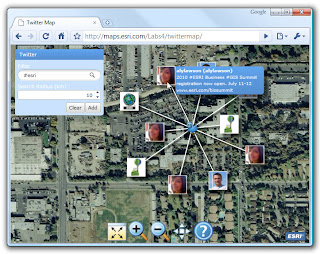
Searching for tweets by location


Searching for tweets by location
If you use a Twitter client on a mobile device that includes a global positioning system (GPS)
sensor, chances are that the client can use that information to update your Twitter location 
information. For example, the iPhone clients Twittelator Pro, Tweetie, and Twitterific can all take
advantage of the GPS sensor in the iPhone 3G.

 Tweets you send are tagged with your current position, so many Twitter updates have an associated location. (For tweets from people who haven’t specified their location or who’ve used some vague or jokey location, this information isn’t so useful.)If you’re interested in locating people who are tweeting near a particular location, you can use Twitter Search to specify that location as well as a distance. For example, you could search for tweets that were sent within 10 miles of Kalamazoo, Michigan.

Here are the steps to follow to search for tweets by location using the Advanced Search form:

 1.  Click the Advanced Search link in a Twitter search page.  The Advanced Search page
appears.

 2.  In the Near this Place text box, type the location.

 3.  Use the Within this Distance list to select a value.  The choices are 1, 5, 10, 15, 25, 50,
100, 500, or 1000.

 4.  Select either Miles or Kilometers.

 5.  Click Search.  Twitter displays a list of tweets that were sent within the specified distance
of the location.

To perform location-based searches from the Search box, you use two operators:near: Use this operator followed by a place name to search for tweets sent from that location.within: Use this operator followed by a number followed by either mi (for miles) or km (for kilometers) to search for tweets within that distance of the location.

One advantage you get with using these operators is that you can use them on their own. For
example, using near: on its own returns all the posts sent from just that location. Similarly, using
within: on its own returns all the posts sent within the specified distance of your current location.
Figure 6.19 shows a search query that looks for posts sent within 10 miles of Indianapolis, and I’ve
also added the search term restaurant.
Referance: http://blogs.esri.com

Twitter Tips--Searching for tweets that mention a person

Twitter Tips--Searching for tweets that mention a person

Reply tweets always begin with @username ,but plenty of tweets mention users by including @
username somewhere within the tweet text. It could be a retweet, a shout out to someone, an
acknowledgment of an original post, a FollowFriday recommendation, or whatever. For these
types of tweets, you can search for updates that include a reference to a user, possibly also filtered
with other search criteria.

To search for tweets that mention a user with the Advanced Search page, follow these steps:

1. Click the Advanced Search link in a Twitter search page. The Advanced Search page
appears.

2. In the Referencing this Person text box, type the Twitter username of the person
whose mentions you want to search.


3. Use one or more of the text boxes in the Words section to specify which tweets you
want to match.


4. Click Search. Twitter displays a list of tweets that mention the person and that match
your other criteria.

To search for a user’s mentions from the Search box, use the @ operator, which you insert
immediately in front of the username. In figure 6.17 I’ve put together a search query that looks for
mentions of the user wordspy that contain the text RT (so they’re retweets)
Referance:dianegottsman.com

Import Contact Scripts - Facebook, Hotmail, Orkut, Rediff, Gmail, Yahoo


Import Contact Scripts - Facebook, Hotmail, Orkut, Rediff, Gmail, Yahoo

Import contacts from Facebook, Hotmail, Orkut, Rediff, Gmail, Yahoo and many more

Do you own a web site / web portal and want to import / invite friends using your members´ Hotmail, Facebook, Orkut, Rediff, Gmail contact book? If yes, integrate import contacts right away with your web site.

Want to know how Import contacts works? People will provide log in details for their Hotmail / Facebook / Gmail / Rediff accounts and we will scrape their contacts and send invitation to register or visit your web site / web portal.

There is great benefit of having this feature in your web site or web portal. It creates chain of marketing email automatically. If you integrate this feature in your web site or portal, your web site can be spread among more and more users very easily and very fast. It will really derive good traffic towards your site. On an average normal person will have at least 25 persons in their contact or address book? Think and try to visualize result of having this feature in your site.

Contact us today for Import contacts more information. You can have this feature in your site at very low cost.
Referance: www.narolainfotech.com

Facebook Marketing 8 Top Tips

Facebook Marketing 8 Top Tips

Facebook Marketing 8 Top Tips 


Facebook has now passed 620 million users and is a social media platform that can not be ignored by any brand trying to build a serious online presence.

Many companies are struggling with their Facebook marketing campaigns.  Some companies have no Facebook marketing campaigns at all!  Many companies still do not think Facebook is revelant.

If you know of a business that is still in doubt of the power of Facebook then you can tell them about these 10 reasons your business needs a Facebook strategy.

Those people looking to join up with a community of Marketers on Facebook should join our Facebook Marketing Mastermind group on Facebook!

You will find a free report at the bottom of this page called: 8 Keys To Success For Facebook Marketing.

Here is my take on the most important points in the Facebook Marketing report:

1. Set Community Expectations

This includes what fans expect from brands such as deals, tips, support or just news and information.

In terms of consistency it is important to post updates on a regular basis.  If you post updates every day for a month, then neglect them for a week, you will be running against the content expectations you have set in your community.

A few posts a week is plenty, and with this style you have enough room to plan a few weeks ahead wit what you will post.

2. Provide Cohesive Branding

Create a familiar experience for fans and differentiate your page from other brands. A great way to make your Facebook page stand out from the crowd is by offering an exclusive piece of content, such as an eBook or video, to people who join your page.

Brands must complete their profile information, upload branded logos and maximize profile pictures. Create custom features and applications that resonate with your brands theme

3. Be Up to Date

Keep interaction high with with fresh timely content. Suggestions are things like ensuring that you have the right mix of of conversational and promotional posts and updates.

Post content using the 80/20 rule: 80% should be informational, educational or have entertainment value. Only 20% of content should be specifically about the brands product or services.

4. Live Authenticity

Build trust by personalizing interactions with a human touch. Post should be written in first person, using a conversational tone.

This will enable deeper relationships and brand loyalty. Administrators should have their names and photos displayed.

5. Participate in Dialog

Connect with customers by fostering 2 way dialog. Two way dialog spurs interaction, trust and the spread of information.

When fans comment, acknowledge them and reward the individual for participation and publicly thank them for being a fan.

Direct conversations with consumers cascades to their network. Each time a fan comments on a Brand’s Facebook page, that interaction is shared with an average of 130 friends.

6. Enable Peer to Peer Interactions

Be efficient and enable the crowds help. Customers are already talking to each other and brands should enable this natural behavior.

Ask fans to respond to each other, showcase fan contributions and recognize top contributors on Facebook’s wall.  One way to do this is to have a “fan of the month” promotion.

Take this engagement to the next level by enabling Facebook’s discussion board features.  Participate in these discussions and feature “customers” top questions and answers.

7 Foster advocacy


Foster word of mouth – the holy grail of marketing. Prospects trust customers more than they trust brands, so promoting advocacy is an essential strategy.

Start by simply asking existing fans to suggest the page to others or “like” a wall post.

Take it to the next level by encouraging fans to do something on the page that is worth sharing with their Facebook , eg “voting on something” or “sounding off” or even sharing videos or photos. Create polls and contests.

8 Feature aCall to Action

Bring it back to business and provide a succinct next step. A “call to action”. Many brands fail to deliver simple calls to action that lead from fans from engagement to purchase.

The idea is is to eventually sell more of one’s product! Start with simple, yet immediate call to actions on your landing page and wall page.

Ask fans to “Like” your page, and sign up for emails or newsletters.

Lead new visitors and existing fans to custom tabs where they can view exclusive deals, browse products and make a transaction.

Check out our Custom Facebook Pages for a few examples of the custom pages we have created, and the calls to action they have featured.
Referance:www.hackingarticles.in

Get 1000 Twitter Followers in a Day


Get 1000 Twitter Followers in a Day


Twitter lies amongst the top position in the list of the most admired and heavily used social networking site. A Twitter user always want his/her tweet to reach the the eyes of as many people as possible. This tricky technique can do the work for them:


get twitter followers

1). http://twittercounter.com/pages/100 is the URL where you will find the record of most followed twitters.

2). Target at least 10 such Twitters.

3). Open each of the profile in a separate tab and follow them one at a time.

4). Here comes the Tricky part, on following an individual your name will come at the top position in the catalog of followers. As a result, the person who follows that individual will also follow you as going after their followers will compel then to follow you.

5). Even if you quit to follow that individual after 5 minutes yet you succeeded in increasing your followers list within that 5 minutes span.

For the beginners, just by following these simple steps, you can surely make a good mark. Advertising today is solely a game in the industry, which results in the formula, the more the ads, the better sales you get. By increasing the twitter followers one may let other people read the updates that one has posted.
Referance: pctipstrickshacks.com

Hide From Some Facebook Friends


Hide From Some Facebook Friends


Appear Offline to Some of Your Friends on Facebook Chat
There might be the case when you don’t wish to chat with few peoples or in other words you want to chat with the selected one. If you get frustrated with the disturbance caused by these “No to Chat” people, in that case, Facebook provides you with the nice facility which enables you to choose the people with whom you don’t want to chat.
It’s a hidden feature which can be enabled by following these steps:
Step 1: Open your account on Facebook.
Step 2: Click on the “Chat” option which is present on the lower right side of your profile.
Step 3: There you will find two options. Choose “Friend List”.
Step 4: There you will find an option of creating a new list. Name it, for example, “Blacklisted”.
Step 6: Now, select or write the names of the people with whom you don’t want to chat.
Step 7: Set the status as offline for this chosen list.
Referance: pctipstrickshacks.com

15 Popular Codes For Smiley Faces & Their Meanings


15 Popular Codes For Smiley Faces & Their Meanings
mileys represent the human face and all its possible expressions that correspond to our various moods. They have been around for decades, but the internet brought them real fame.
Online, smileys are a powerful way to transport emotions. The typographic smileys are generally known as emoticons. Placed with care and read with an eye for detail, they clarify the meaning of a statement and improve interpretation.
Meanwhile, chatters across the globe have developed a huge selection of emoticons and smileys on most instant messengers. If you always want to hit the right nerve and never pick the wrong expression, use our emoticon guide to popular codes for smiley faces.
Western Emoticons
Western emoticons are typically written from left to right. Here are 15 of the most popular ones.
1. Smile
: – )   or   :-]   or   :3   or   :> stands for happiness.
2. Grin
: – D   expresses great happiness or a victory.
3. Frown
: – (   or   :-c represents sadness or disappointment. The latter can also mean great sadness.
4. Wink
; – )   or   ,-)   or   *-) indicates a joke or double entendre in what was said.
5. Tongue
: – P   or   : – p     or   :-b is an emoticon to tease, often used as a joke.
6. Open mouth
:-O   or   : – () stands for surprise or shock.
7. Distorted mouth
: – / means skepticism, being annoyed or uneasy.
8. Beaked lips
:-X   or   :-*   or   :-<> expresses a kiss, love and affection. But careful, this one can be ambiguous.
:-@   or   : – ) ~~ ( – :   or   : – )~~~~ stand for french kissing.
9. Sealed lips
:-X   or   :-# stands for embarrassment. Notice the ambiguity.
10. Halo
0:-) represents an angel or innocence and is often used in a playful manner.
11. Tear
:’-( shows a crying face and expresses sadness.
12. Horns
>:-)   or   >:-D is used to express evil.
13. Blank
: – | expresses boredom, but can also stand for no comment.
14. Spittle
:-p~~ represents drooling.
15. Arrow
>.>   or   <.<   or   >_>   or   <_< points the way in which to look. Technically, this is an eastern emoticon.

Use Facebook: 5 Tips For Better Social Networking


 Use Facebook: 5 Tips For Better Social Networking
 Use Facebook: 5 Tips For Better Social Networking
Facebook is a social networking site that is enormously popular, but it can be a frustrating user experience. The design of Facebook leaves a lot to be desired and there are almost too many choices for things to do on Facebook. Also some of the more popular Facebook activities are trivial instead of useful - throwing sheep is an oft-quoted example.

Having said that, there's no doubt that Facebook is a powerful social networking tool. So how can you best utilize it and find the good apps? In this post we aim to find out. We'll be focusing specifically on social activities, rather than the many other potential uses of Facebook (work, brand management, etc).

Tip 1: Update Your Status Regularly
This is a simple thing to do to keep your Facebook profile active. Right at the top of the page there is a place where you can "write something." Usually a comment about what you're doing or thinking. Once a day, or even once every few days, is enough. But update it enough to keep your page interesting.

Tip 2. Use Groups (a.k.a. Lists in Facebook Terminology)
Groups are a core feature of social networking on the Web. To effectively use Facebook, we recommend you set up some groups so that you can filter content. One person who does this very well is our own Marshall Kirkpatrick. Marshall says that he generally scans his Facebook homepage first, then clicks to his groups for family and old friends from school. He noted that "this way most of my time spent on Facebook isn't re-reading the same things I've already read on Twitter."


There is a bit of a trick to setting this groups feature up. Facebook calls this feature "lists," probably to differentiate them from its other Groups feature (which have been usurped by 'Pages' now). Confused? Get used to it, Facebook navigation is awful.

To set lists up for your Facebook account, go to your Facebook homepage and click the "more" link on the left-hand sidebar. You will see a link entitled "Create new list" at the bottom - click on that to create a new group.


Tip 3: Add Your Content From Other Sources (Carefully...)
In this day and age, you are likely creating content in more than a few places on the Web. This ranges from the extreme cases (early adopters who have personal RSS feeds coming out their ears), to those who may just use YouTube and a couple of other niche social websites.

Many early adopters use FriendFeed to aggregate their 'lifestream' of content from multiple sources. Facebook just bought FriendFeed, so expect to see it integrated into Facebook over time. As of now, if you have more than a few content sources and they aren't necessarily the well-known ones like YouTube or Last.fm, then you'll need to use FriendFeed or an equivalent lifestreaming product to aggregate those feeds. But if you find FriendFeed just a bit too geeky (and many people do), then you can adequately enrich your Facebook profile with external content.

One thing we'd caution, which this author took too long to notice: don't pipe your FriendFeed content into Facebook if you aggregate a lot of content into FriendFeed! It quickly overpowers your Wall and will likely annoy the friends you have who also subscribe to your FriendFeed.


To add external content to Facebook, on your Wall page click the 'Options' link on the top right. Then click 'Settings.'

You can then choose to "import stories" to your Facebook wall from a select number of sites: Flickr, Digg, YouTube and others.

You can add content from other external sources to Facebook by clicking the 'application settings page' link further down the page.

Tip 4: Brighten Up Your Profile With Photos and Videos
This almost goes without saying, but adding multimedia makes your Facebook profile interesting and attractive.

If instead of Facebook you usually use a specialist photo site (like Flickr) or video site (like Vimeo), then you'll need to search around for ways to export your files. I use Flickr and didn't find a satisfactory way to export photos from Flickr to Facebook's Photo albums. But via my Twitter network I managed to discovered a plug-in for iPhoto, which allows Mac users to bulk export from iPhoto to Facebook.

Tip 5: Search Out the Best Facebook Apps
Ever since Facebook became a development platform back in May 2007, thousands of apps have been built to add to your Facebook page. As noted in the introduction, these range from trivial (e.g. sheep throwing) to very useful. The best tip here is to find apps that complement your interests.

Our advice is to search the directory for keywords of interest to you. The quality of apps varies greatly and often there are errors (at least I came across them several times when researching this article). When you find an app you like, you can add it to your profile. I added an Art app recently, for example.

You can browse a user's apps by clicking the oddly-named 'Boxes' tab on their profile page.

5 Tips for Getting More From Twitter


5 Tips for Getting More From Twitter
1. Tweet great content 3-4 times a day – Follow people who always find great
stuff, subscribe to blogs that feature great links and reviews of new tools, scan
weekly and daily email news digests such as SmartBriefs, cruise over to the
delicious popular page and read print publications of interest. All of these sources
(most of which can be scanned in a 15 minute sitting once you have them set up)
are rich with content that your followers and the twitter world in general wants to
read. One of the most valuable services you can provide is to be a filter for the
information overload your prospects, customers and network are feeling. In a
way, your twitter stream can become that valuable filter for pointing out the best
content, but do it consistently and watch your follower count grow.

2. Reply to conversations (@ducttape) – One of the best ways to get engaged
with those you follow is to join conversations where appropriate and offer
answers and suggestions. Many common tweets come in the form of a question
from someone looking for help. When you offer the solutions to these forms of
tweets you automatically become more engaged and demonstrate some of your
own knowledge, expertise and willingness to help. Obviously, you can’t sit
around all day answering questions, but by focusing on addressing conversations
that are related to your industry and field of expertise, you can build a reputation
around topics that matter to your business objectives. Use 3rd party tools such
Duct Tape Marketing – © Copyright 2009 all rights reserved – used with permission
Disclaimer – services listed are beta and may change or even harm your computer – not my fault!
11
as Seesmic Desktop (make sure you look at their browser based tool if you are
having resource issues with desktop tools) or Tweetdeck so that you can easily
scan conversations and be ready to reply to conversations that are directly
related to you.
3. Retweet other people’s content 
Another network and follower building
practice is to retweet other people’s tweets. This is simply the act of taking
someone’s tweet and tweeting it in your stream – with full credit to the original
tweeter. This has become a very standard practice on twitter (designated with a
RT) and can be overdone, but you can also use it for two purposes. If you are
following people who tweet what you find to be very interesting content you are
doing your followers a favor by sharing that content with them. In addition, you
are, in effect, acknowledging the person whose content your retweeted. This is a
nice bit of the culture of sharing and usually comes back in some form to help
you build your following. People generally pay attention to the folks that are
retweeting their content. However, this can become a crutch as well – make sure
you are pushing your own content out in a nice mix. You can use tools like
tweetmeme to track the most popular retweets. This can be a way to find new
content for tip #1.
4. Use search to meet objectives
 For many twitter power users search in the
most important feature of twitter. You can use the twitter advanced search tool to
create very elaborate searches that can filter out only the tweets that address
your specific industry in your specific geography. Or you can find people talking
about your expertise, whining about a problem you can help with, or proving a
solution you need. Searches you create on twitter also produce an RSS feed so
you can set your searches up in a way that deliver the results to your RSS reader
on a daily basis. I would also include the use of the #hashtag function (I wrote in
greater detail about hashtag use here) as a search tool. Get in the habit of using
it to promote your events and promotions and while attending events, in person
or online, as it’s a great way to find and connect with like-minded folks attending
events. People who follow the event tag from afar will bump into your content this
way as well. Once again, 3rd party tools like Seesmic Desktop and Tweetdeck
allow you to monitor your searches, including hashtags, on your desktop.

5. Be easy to retweet and follow
This one is both on twitter and off. Sharing
great info is the first rule, but you can do other things as well. While twitter allows
140 characters, if you aim for 120 your tweets will be easier for someone to RT.
This way people can add their handle and a bit of commentary. Use tools, such
as the Tweetmeme Wordpress plugin I have at the beginning of this post (go
ahead you know you want to click that green retweet), that make your content off
twitter easy to tweet. Add your “ follow me on twitter” button to web pages, email
newsletters and email signature. Add your @name to your business cards,
stationary and invoices.
Referance: www.buyrealtwitterfollowers.com

Cleaning up Your Twitter Account


Cleaning up Your Twitter Account
Cleaning up Your Twitter Account 
This is something I have begun to do with my account. Up to now, I have been following everyone who
follows me but I have begun to realise this is the wrong move for several reasons.
One, it doesn’t look professional to be following spam
accounts and it shows a certain degree of “I’m so
desperate for followers that I’ll follow the spam bot with the
bikini picture”.
Second, following everyone just creates too much noise.
There are people with 15,000 – 20,000 users. How can you
possibly follow, track and answer 15,000-20,000 people all
at once? Simply put, you can’t.  Plus if you’re following
spam accounts too, the real Twitter users are being drowned out with offers of free marketing reports,
special discounts on a wide range of crap and so on.
Third (and this is just my personal opinion), Twitter is all about connecting with people on a personal
level. Why follow people who are not interesting to you and who are not saying interesting things
relevant to you? Just cut all that out and follow people you are genuinely interested in what they have
to say. Suddenly you will find your Twitter experience to be a much nicer one.
Obviously when you have several thousand built up like I do, it becomes more and more difficult to
clean out the account without devoting several hours to it. But here’s the best ways to get started.

If you are a Firefox user, use the Greasemonkey script, Twitter User Classify
35                                                     

the top of every Twitter user page whether that person is considered to be a spammer or not.
They base it on the number of followers, the number of people that person is following back,
the number of Tweets and I’m sure a few other factors. This won’t help you clean up your
current list but it will help you in the future to avoid spam accounts

Searching Twitter to Stay on Top of the Trends


Searching Twitter to Stay on Top of the Trends 


If you really want to be part of the mainstream Twitter conversation, it pays to follow the current trends
– and the newly designed Twitter website makes that easy to do (see above).
You can see at a glance which topics are hot “by the minute, day and week” so if you instantly want to
jump into a conversation, just pick a topic and go for it. Just don’t forget to enter the relevant keyword
or hashtag into your Tweet so it gets bundled up with the others.

There are actually lots of benefits to using Twitter as your search engine, instead of using say Google 
or Yahoo. Let’s see why.
Google and Yahoo are both excellent search engines but when you closely analyse them, they are
just computer algorithms. They are (obviously) not human, they don’t have feelings or emotions, and
they just return results to you based on your keywords
Now for part of the time, that’s all you need. If you want to know the birth date of say Winston Churchill
for your school history essay then a computer algorithm can easily return you the pages you need. But
what if you want to know something more personal? What if you want to know where to get the best
ice-cream in London? Or if you want to know if Gmail is down for other people besides yourself at that
moment? This is where the computer  algorithm hits its limits, because it can’t make personal
preferences and it can’t respond to real-time information requests. It can only rely on spider-visited
websites which may have been crawled say a month ago.


If you really want to be part of the mainstream Twitter conversation, it pays to follow the current trends
– and the newly designed Twitter website makes that easy to do (see above).
You can see at a glance which topics are hot “by the minute, day and week” so if you instantly want to
jump into a conversation, just pick a topic and go for it. Just don’t forget to enter the relevant keyword
or hashtag into your Tweet so it gets bundled up with the others.


There are actually lots of benefits to using Twitter as your search engine, instead of using say Google
or Yahoo. Let’s see why.
Google and Yahoo are both excellent search engines but when you closely analyse them, they are
just computer algorithms. They are (obviously) not human, they don’t have feelings or emotions, and
they just return results to you based on your keywords
Now for part of the time, that’s all you need. If you want to know the birth date of say Winston Churchill
for your school history essay then a computer algorithm can easily return you the pages you need. But
what if you want to know something more personal? What if you want to know where to get the best
ice-cream in London? Or if you want to know if Gmail is down for other people besides yourself at that
moment? This is where the computer  algorithm hits its limits, because it can’t make personal
preferences and it can’t respond to real-time information requests. It can only rely on spider-visited
websites which may have been crawled say a month ago.

How to Send Password Protected Email Messages


How to Send Password Protected Email Messages

If you have to send some confidental information like credit card numbers,Bank details etc it may not be secure to send it without any encryption and password protection.Hackers can use sniffers to intercept your email messages or they can retrieve the data after hacking email accounts.To protect yourself from such situations you can use Lockibin which provides password protection and AES-256 bit encryption to your emails.

How to Send Password Protected Email Messages:

Click here to go LockBin online service.
Fill the form with your desired password.
In the text filled write your message. You can also attach a file if you want.


How to Send Password Protected Email Messages


After this, click on Submit button.
Now your password protected mail will be sent. (Receiver will only get a link to your password protected and encrypted email)
When receiver clicks on that link  it will prompt to enter the password otherwise it will not be open.


How to Send Password Protected Email Messages


That’s it! But you have to send password to your friend which can be sent on Mobile number or you can send a normal Email for it.The password protected email is stored in lockbin server itself.
Referance: www.pctipstricks.net

How To Download Facebook or Youtube Videos Without Any Tools


How To Download Facebook or Youtube Videos Without Any Tools

Have you ever liked a video shared by your friend on facebook and wanted to download it…Well this this tutorial is not only for facebook or youtube instead it can be used for any video streaming website like metacafe,dailymotion,veoh or yahoo videos.There are websites on the internet that will convert your video link into a download link but it has the following drawback

If you already watched the whole video and then you decide to download it to your computer it will take double time becuase you already have spent time watching it and now have to spend time downloading it to your hardrive.
Moreover, the download speeds are very slow and its very irritating to download the whole video again.
But if you have already played the whole video on the site then there is no need to waste the time on downloading it again.We simply have to locate the cache folder of the browser as when the video is streamed it is automatically saved in the cache folder and just have to copy paste the video file from cache folder to your desired location in your computer.

Before reading this tutorial make sure that you have uncheck the hide files and folders box.If you dont know how to unhide files and folders Click Here

Here is the step by step tutorial with screenshots on how you can locate the cache folder for various browsers in various operating systems


Case 1:Google Chrome

For windows Vista and Windows 7

If you use google chrome in windows vista or windows 7 then here is the location of the cache folder

C:\Users\USER_NAME\AppData\Local\Google\Chrome\UserData\Default\Cache

C, being the system root. If you are not sure about the system root you can replace C: with %systemroot%.

Also donot forget to replace USER_NAME to your windows username

For Windows Xp Users

In windows Xp the google chrome cache folder can be found at

C:\Documents and Settings\USER_NAME\Local Settings\Application Data\Google\Chrome

CASE 2:Mozilla Firefox

For Windows 7 and Windows Vista

The temporary cache folder can be located at

C:\Users\USER_NAME \AppData\Roaming\Mozilla\Firefox\Profiles

For Window Xp Users

The temporary cache folder can be located at

C:\Documents and Settings\USER_NAME \Local Settings\Application Data

CASE 3:Internet Explorer

In case of Internet Explorer you need to go to Tools>Internet Options and then in Genreal tab click on Settings button

How To Download Facebook or Youtube Videos Without Any Tools


A new window will popup in front of you now click on View Files button.

How To Download Facebook or Youtube Videos Without Any Tools

How To Find Your Video In Cache Folder

Once you have found the cache folder of your browser the next thing you have to do is locate your video file.To do this arrange the files of the folder according to their size because video files are usually large in size.Open the largest files with Vlc player.Once you have found your video just copy it to your desired location.

Note:There are usually Some data files with names like data_1 in cache folder.Donot open them with Vlc open the rest of the files with Vlc and you will easily find your video.
Referance: www.pctipstricks.net

Twitter, Facebook ou orkut?


Twitter, Facebook ou orkut?

Twitter, Facebook ou orkut?


O orkut ainda é a rede social mais popular do país, mas agora enfrenta dois concorrentes de peso: Twitter e Facebook. Qual deles merece o prêmio INFO?

O Twitter caiu no gosto dos usuários brasileiros neste ano. De acordo com dados do Ibope Nielsen Online, o serviço de microblogs tem nada menos do que 8,5 milhões de perfis em terras tupiniquins. É muita coisa. Não por acaso, o Twitter tornou-se um dos sites mais usados para compartilhar links. Parte do crescimento foi consequência da adesão em massa de blogueiros e celebridades, que estimularam seus fãs a tuitarem. Emplacar termos brasileiros nos Trending Topics virou mania. Quem não se lembra do sucesso do “Yes, We Créu” no dia em que o Rio foi escolhido como sede da Olimpíada de 2016?

O Facebook ainda está na lanterna no país, mas vem ganhando adeptos a cada mês. Com mais de 1,3 milhão de brasileiros, a rede social tem três grandes trunfos na manga: as avançadas opções de privacidade, o streaming de atualizações e os joguinhos. Deixar informações visíveis apenas para quem realmente deve vê-las foi o que levou a rede social a ultrapassar os 300 milhões de usuários no mundo. Aplicativos de entretenimento, como o Farmville e o Mafia Wars, também têm ajudado a trazer internautas. A rede declarou guerra ao orkut, e tem facilitado a importação de contatos do rival.

Por falar na rede social do Google, seus números continuam impressionantes. Dados atuais indicam que mais de 30 milhões de brasileiros mantêm perfis ali. Compartilhar fotos e vídeos tornou-se regra, e acompanhar as atualizações dos amigos, também. Os aplicativos caíram no gosto dos usuários, principalmente quando permitem a interação entre eles – é o caso dos populares BuddyPoke e Vou, Não Vou!. O orkut continua a ganhar funcionalidades. Neste ano, o serviço ganhou reconhecimento de faces nas fotos, bate-papo por vídeo e voz e o Promova!, um recurso que permite desde colocar anúncios até compartilhar links interessantes com os amigos.

Quem merece erguer o troféu? Se você é assinante da INFO, pode votar no site www.premioinfo.com.br. Se comprou a revista na banca, é só preencher o formulário e enviar para a gente.

FACEBOOK PROMOTION


 FACEBOOK PROMOTION,facebook business pages, create a fan page, money maker, make money on facebook, create facebook fan page, paid surveys, make money online fast, facebook business page, facebook advertising, create a facebook page
facebook for business, create facebook page, facebook create a page
facebook create page, online money making,make money blogging
facebook fan page, make a page on facebook, facebook company page
how i can make money, fan page on facebook, make money with facebook
how to make money blogging
 FACEBOOK PROMOTION
Crowdsource: Ask fans to tell you what coupon they want next or what recipe
they want to see next on your blog. Make sure if you are asking for fan feedback, 
you are able to act on it first.

Make your Facebook page part of a larger contest or campaign: For instance
post clues on your wall as part of an online scavenger hunt that includes your
Twitter account, blog, and Youtube channel.

Control the description text Facebook displays when you share a link. When
you share a link on your wall, the text under the page title is called your meta
description. By default this text will usually be an excerpt of the first few words
on the page.

Include links in text status update and not the links box. The update will display
the link as clickable in addition to the normal title, photo, and meta description of
the link. At a minimum this allows an additional opportunity for a fan to click the
link. These links stand out as different and can get clicked on more.

Keep fans on Facebook: When promoting contests, email sign ups, sales pages
or other calls to action, send fans to a Facebook tab for these actions whenever
possible. Research shows conversion rates increase when Facebook users do not
have to leave Facebook.

FACEBOOK GENERAL TIP


FACEBOOK GENERAL TIP,facebook business pages, create a fan page, money maker, make money on facebook, create facebook fan page, paid surveys, make money online fast, facebook business page, facebook advertising, create a facebook page
facebook for business, create facebook page, facebook create a page
facebook create page, online money making,make money blogging
facebook fan page, make a page on facebook, facebook company page
how i can make money, fan page on facebook, make money with facebook
how to make money blogging
FACEBOOK GENERAL TIP

1. Use every status update category: Text, links, images and video. Variety increases
reach and user engagement.
2. Use the 80/20 rule: 80% of status updates should give value to the fans first, 20%
of status updates can be promotional, or brand first.
3. Post like a friend, not a brand: Humanized language gets a better response.
Trademarks and press release styled writing destroy the potential for a
relationship and turn fans away.
4. Reply to fans when they comment on status updates. This encourages fans to
comment more and increases the total interactions count for an update.
5. Stop automating blog post or tweets to Facebook. Facebook is its own platform.
Treat it accordingly.
6. Break News: Announce products, sales, website poll results, event news and
more. If users know your Facebook wall is the most timely source for certain
news it will drive them back.
7. Like other pages as a page: Find pages that are related to your business. Mention
and thank these other pages to encourage cross promotion partnerships.
8. Avoid complicated words and phrases: Fans respond more to simple language.
9. Talk about Facebook: Facebook is the most shareable topic on Facebook
(according to HubSpot research). Try to include Facebook mentions that are
relevant to your brand or industry instead of just posting about Facebook
generically.
10 Use short status updates: Use 10 words or less when possible.
Celebrate milestones. People like numbers and they like celebrating. Share with
fans when you reach 5000 fans or your first status with 100 likes. The more
creative the better.
Exclaim! Start a status update with an enthusiastic declaration like “Wow,”
“Whoa!” or “Hot Diggiddy.” Use corny eclamations at your own risk.

Top Tips for Ongoing Ads Management


Top Tips for Ongoing Ads Management, facebook business pages, create a fan page, money maker, make money on facebook, create facebook fan page, paid surveys, make money online fast, facebook business page, facebook advertising, create a facebook page
facebook for business, create facebook page, facebook create a page
facebook create page, online money making,make money blogging
facebook fan page, make a page on facebook, facebook company page
how i can make money, fan page on facebook, make money with facebook
how to make money blogging
Top Tips for Ongoing Ads Management 
Keep testing and improving
The most successful advertisers on
Facebook refresh their ad creatives every
10–12 days. Test multiple ads and use the
reporting in your Ads Manager to see which
has the biggest impact.
Keep this list close by and refer
to it regularly.
Body text:
1 Ask questions to engage your audience
2  Include a call to action – tell users what
you want them to do
3 Highlight discounts or free offers
4  Keep the language simple, short
and concise
Image:
5  Use an image that speaks to
your audience
6  Avoid logos unless your business
is a very well-known brand
Destination URL:
7  Send users to a relevant landing page
Targeting:
8  Choose a location where your
customers live
9 Use the profile of your current
customers to understand what
demographics you should filter your
audience by
10  Target users based on their interests and
likes, not what they might search for
Checklist
– Body Text
– Image
– Destination URL
– Targetinga